
Run the business. Not the paperwork.
We build the systems and apps that move work through your business on their own: requests become quotes, quotes become booked jobs, jobs become paid invoices, and nobody retypes a thing. Built around how you already work, without forcing you into Salesforce, by our team in Greenville, SC, for businesses across the country.
- New requestFrom the website, a call or a textRouted
- Quote sentBuilt from your prices, signed onlineSigned
- BookedOn the calendar and the crew’s phonesScheduled
- Crew on siteChecklist, photos, notesChecked in
- Invoice paidCard or bank, straight to your booksPaid
- Review askedSent at the right momentSent
Big software makes you work its way. Ours works yours.
Most small businesses end up paying for a stack of apps that each do one piece, then spend hours moving information between them. The other choice is a big platform with features you’ll never use and a setup that needs a consultant. We build the thing in between: your steps, your words, your reports, and only the screens your people actually need.
| A stack of apps | A big platform | Built for you | |
|---|---|---|---|
| What you pay | A subscription for every app, for every person | Licenses per seat, plus a consultant to set it up | The build, then hosting and support |
| How it fits | Each app has its own idea of how you work | Fits once someone configures it, and again when it changes | Your steps, your words, your reports |
| Where the information lives | Copied between apps by hand | One place, full of screens your team skips | One place, with only the screens people need |
| Who changes it | You wait on the vendor | An admin or an outside consultant | We do, when you ask |
| Your data | Spread across vendors | On their platform, exported on their terms | Yours, with a full export any time |
Pick a part of the business.
Each of these can stand alone or share the same records with the rest. Most clients start with the one that hurts most.
Every lead caught, answered and followed up, without a sticky note.
Lead intake and routing
Website forms, calls and texts land in one list and go to the right person. No lead sits in an inbox.
Quote and estimate builder
Your price list, your options and your terms, sent as a clean quote the customer signs online. Quotes in minutes, not evenings.
Follow-up reminders
The system nudges the rep when a quote goes quiet and can send the check-in itself. Fewer jobs lost to silence.
A pipeline in your own words
Your stages, from first call to signed, with the next step always in front of the person who owns it.
Field sales and territories
Maps, daily routes and visit logging for reps on the road, synced to the office as they go.
The right person at the right place, and everyone knows about it.
Online booking
Customers pick a real open time from your website or app, based on who’s free and how long the job takes. Fewer phone calls just to schedule.
Dispatch board
Drag a job to a person or truck and their phone updates. See the whole week, day and crew at a glance.
Route planning
The day’s stops in a sensible order, with drive times, so less of the day is spent in traffic.
Automatic reminders
Texts and emails before the visit, with a way to confirm or reschedule. Fewer no-shows and wasted trips.
The crew has what they need on their phone, and the office sees it as it happens.
A job app for the crew
Today’s jobs, addresses, notes, gate codes and the customer’s history, all in one tap. No more calling the office.
Checklists, photos and signatures
Every step done the same way, with before and after photos and a signature on the spot.
Inspection and service reports
Filled in on the phone and sent to the customer as a branded PDF before the truck leaves.
Time clock with location
Clock in and out at the job, so payroll and job costing use real hours, not guesses.
Parts and material requests
The crew asks from the job, the office orders, and nothing gets forgotten in a text thread.
An easier experience for customers, and fewer “just checking in” calls for you.
Customer portal
One sign-in to see appointments, quotes, invoices, photos and documents. Customers answer their own questions.
Order ahead and pay
Menus or product lists you can change yourself, with Apple Pay and the payment tools you already use.
Rewards and memberships
Punch cards, service plans and member pricing that renew and track themselves.
“On the way” updates
A text or notification when the crew heads over, so nobody waits by the window.
Review requests
Asked automatically after a finished job, at the moment the customer is happiest.
The money side runs on the same records as the work, so it’s right the first time.
Invoicing and payment reminders
Invoices made from the finished job and chased politely until they’re paid. Less time spent collecting.
Inventory and purchase orders
Stock that counts itself down as jobs use it, with a heads-up before you run out.
Job costing
Labor, materials and drive time against what you charged, so you know which jobs actually make money.
An owner’s dashboard
The numbers you ask about every Monday on one screen: booked, done, billed, owed.
Documents and contracts
Agreements, permits and warranties stored with the customer and the job, not in someone’s inbox.
New hires get up to speed faster, and the way you do things is written down.
Onboarding and training
Step-by-step lessons and sign-offs on a phone, so every new hire learns it the same way.
Approvals
Time off, purchases and discounts requested in one tap and approved from anywhere.
How-we-do-it library
Your procedures, checklists and videos in one searchable place, kept current.
Team announcements
Schedule changes and updates that reach everyone, with a way to see who’s read them.
Keep what works. Connect the rest.
If QuickBooks runs your books or Square runs your counter, we don’t rip it out. Your system sends the invoice to QuickBooks, pulls the sale from Square and puts the appointment on your Google or Outlook calendar.
And if the honest answer is that a tool you already pay for can do the job with a better setup, we’ll tell you that first.
Books and payments
QuickBooks, Square, Stripe and card readers.
Calendars and email
Google Workspace and Microsoft 365.
Your website
Forms, booking and ordering that feed the same records.
Texting
Reminders, updates and two-way texts from your business number.
Different businesses, same idea.
Including the systems we run our own business on every day.
LASSO
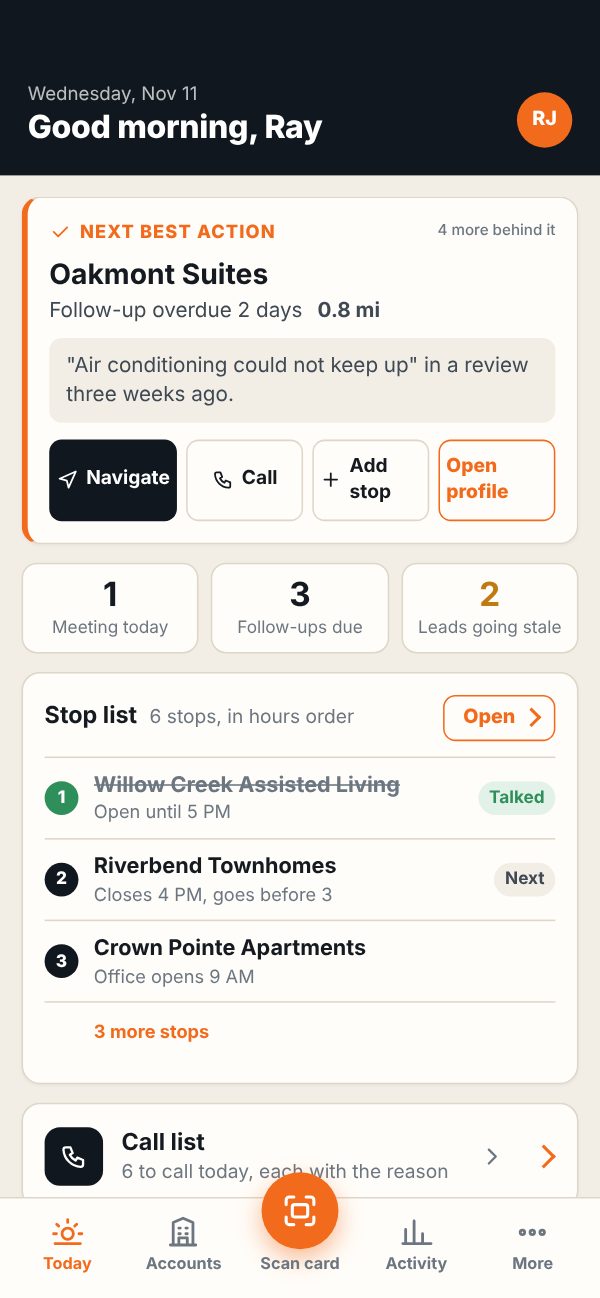
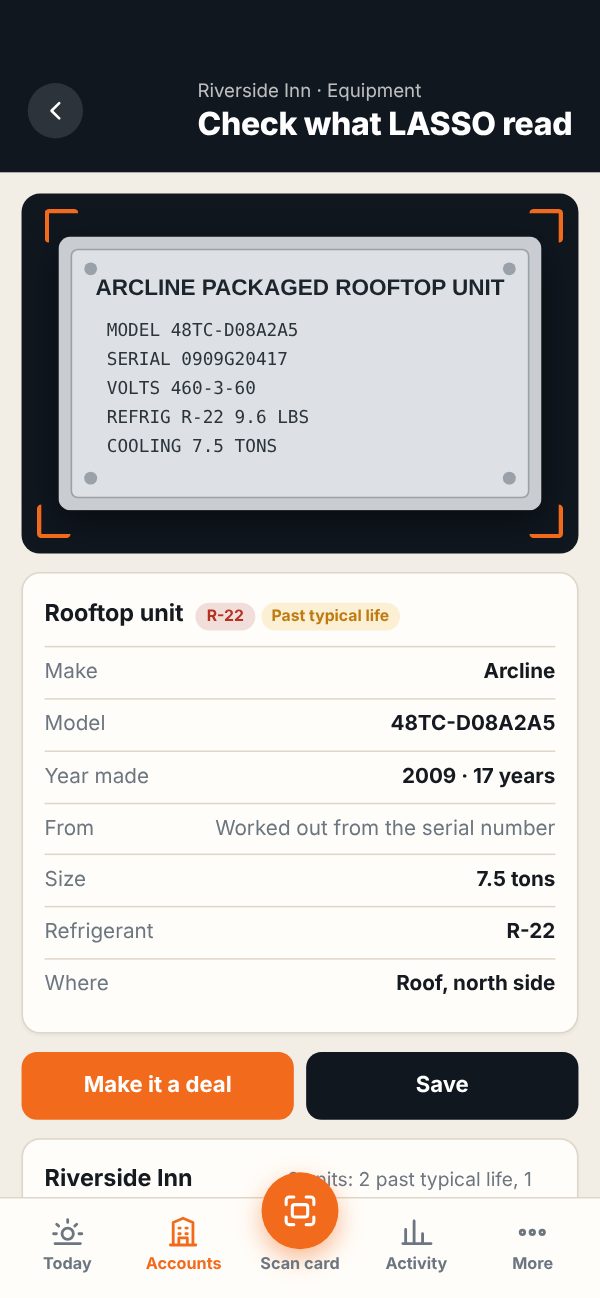
A complete sales system for reps who sell to commercial buildings, with an iPhone app and a web portal. On the App Store and in daily use.
- Scores every building in a territory and plans the route inside business hours
- Reads business cards and equipment nameplates with the phone camera
- Turns a voice note in the truck into the note, the deal and the follow-up
- Routes quotes to project managers and flags contracts before they lapse
TEMPO
Tracking Engagements, Milestones, Projects and Orders. Every job we do gets a ticket number and a step list with an owner and a date on every step. Requests by email, phone or chat wait in one intake list, and the Monday digest says what’s late.
- P 1088Website rebuildWaiting on the client for contentClientWill
- C 1091Monthly SEO, NovemberRank report due FridayOn trackNathan
- O 1094Business email, 6 boxesDNS records nextOn trackRoger
- P 1096Mobile app, order aheadTest build to the clientOn trackJosh
- I 1097Server updatesDue todayTodayRay
The Kennel
One sign-in that shows what the day brings. Client emails, open work, billing, rankings and site health sit on the same screen, so nothing gets missed between inboxes and apps.
Good morning. Here’s what the day brings.
- Nathan filed a website request as a new ticket
- Will closed the content step on P 1088
- Ray finished the November rank report
Huttig Kaffee
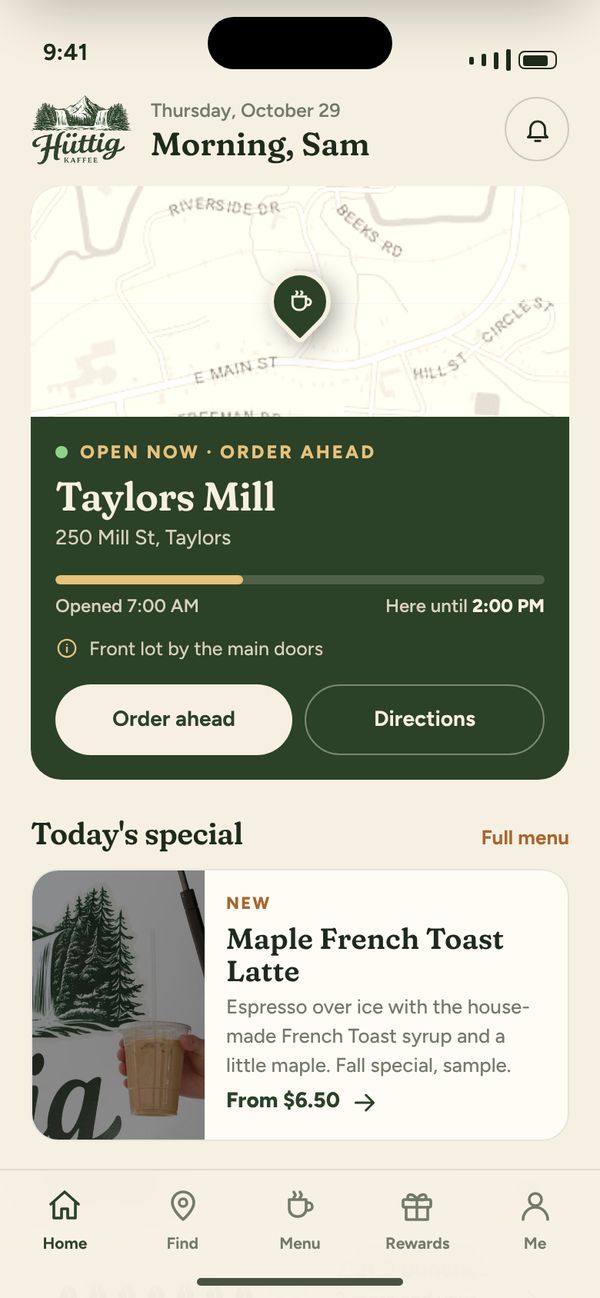
A coffee trailer’s app with two sides. Customers find the trailer, order ahead with Apple Pay through the shop’s own Square account and collect rewards at the window. The owner runs the menu, the order queue and where the trailer is today.
Tap through both sides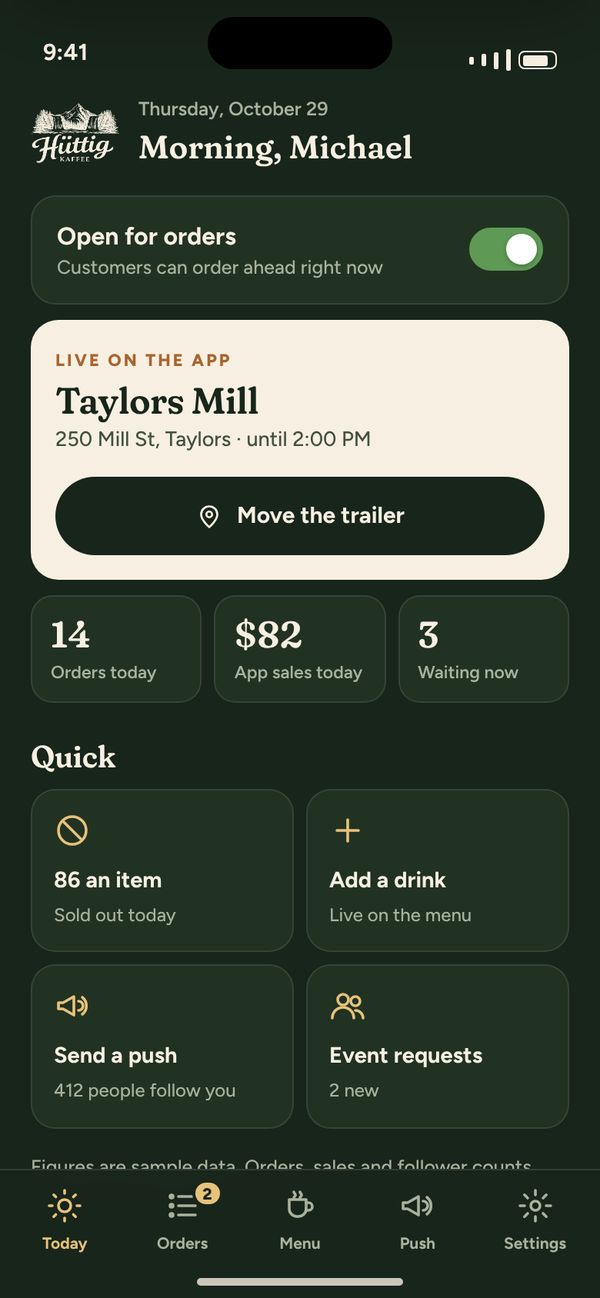
Start with one piece. Add the next when it pays off.
- 1
Walk us through a day
We sit with the people doing the work and map every step, tool and workaround, then agree on the first piece and a price.
- 2
Use it early
Your team tries the first working version with real jobs, so it’s shaped by how they actually work.
- 3
Grow it with you
We bring your old records over, train the team, support it, and add the next piece when you’re ready.
Good questions. Clear answers.
Why not just buy Salesforce or another off-the-shelf app?
Is custom software only for big companies?
What does it cost?
Can our team use it on their phones?
Who owns it, and what about our data?
Who supports it after launch?
Tell us where the day gets stuck.
The spreadsheet nobody trusts, the texts that get lost, the step someone does by hand every Friday. Walk us through it and we’ll tell you what we’d build first.
Know it’s a phone app? Mobile app development.